Promotion Name or Product Name hide Apply Now /html/en/index.html _self

Features


Tools

Promotion Video (Chinese Only)

Eligibility

Company must be a 328 Business Banking Customer

Company must hold a 328 Business e-Banking or Mobile Banking

Cardholder must hold a valid identification document

Act Now

New customer apply 328 Business Account

Enquiry of Product / Promotion (Mon – Fri: 9:00am to 5:00pm)

New customer apply 328 Business Account

Enquiry of Product / Promotion (Mon – Fri: 9:00am to 5:00pm)

New customer apply 328 Business Account

Enquiry of Product / Promotion (Mon – Fri: 9:00am to 5:00pm)

Apply Dah Sing Business Multi-Currency Mastercard Debit Card via 328 Business Mobile Banking

Scan the QR code below to download / open our Mobile App


328 Business Mobile App328 Business Mobile App QR code

If you cannot use Google Play™ Store, please click here to download

Apply Dah Sing Business Multi-Currency Mastercard Debit Card via 328 Business Mobile Banking

Scan the QR code below to download / open our Mobile App
328 Business Mobile App328 Business Mobile App QR code

If you cannot use Google Play™ Store, please click here to download

Apply Dah Sing Business Multi-Currency Mastercard Debit Card via 328 Business Mobile Banking

Scan the QR code below to download / open our Mobile App
328 Business Mobile App328 Business Mobile App QR code

If you cannot use Google Play™ Store, please click here to download

The Promotion is from 26 Jan 2026 to 31 Mar 2026 (both dates inclusive).

For DAH SING CREDIT / DEBIT CARD CARDHOLDER AGREEMENT ("CARDHOLDER AGREEMENT") (including RMB Cards), please click here.
For Terms and Conditions for Debit Card [Addendum to the Dah Sing Credit / Debit Card Cardholder Agreement ("Cardholder Agreement") (including RMB Cards)], please click here.
For Major Terms and Conditions for Dah Sing Multi-Currency Mastercard® Debit Card ("Debit Card"), please click here.
For Specific Terms and Conditions for Dah Sing Business Multi-Currency Mastercard Debit Card ("Business Debit Card"), please click here.
For Terms and Conditions for the Dah Sing Business Multi-Currency Mastercard Debit Card Debit Card Welcome Offer, please click here.

Foreign Currency Trading - Foreign currency trading involves risks. Foreign currency investments are subject to exchange rate fluctuation which may provide both opportunities and risks. The fluctuation in the exchange rate of foreign currency may result in losses in the event that the customer converts the foreign currency into Hong Kong dollar or other foreign currencies. Before making investment decision, investors should read and understand the offering documents of such products, including but not restricted to the risk disclosure statement and health warning.

Currency Risk (Renminbi ("RMB")) - Exchange of RMB to HKD or other currencies is subject to currency exchange rate fluctuations. Customers should bear the risk of RMB exchange rate fluctuations which may cause profit or loss if customer chooses to convert RMB to HKD or other currencies. RMB is currently subject to exchange controls imposed by the PRC government, the exchange rate may be easily affected by change in government policies.

Unless the context requires otherwise, this website does not constitute any offer, invitation or recommendation to any person to enter into any foreign currency transaction nor does it constitute any prediction of likely future movements in prices of any foreign currencies. This website has not been reviewed by the Securities and Futures Commission or any regulatory authority in Hong Kong.


The service(s) / product (s) mentioned herein are not targeted at customers in the EU.

Demo

Activate Debit Card (Via 328 Business e-Banking)

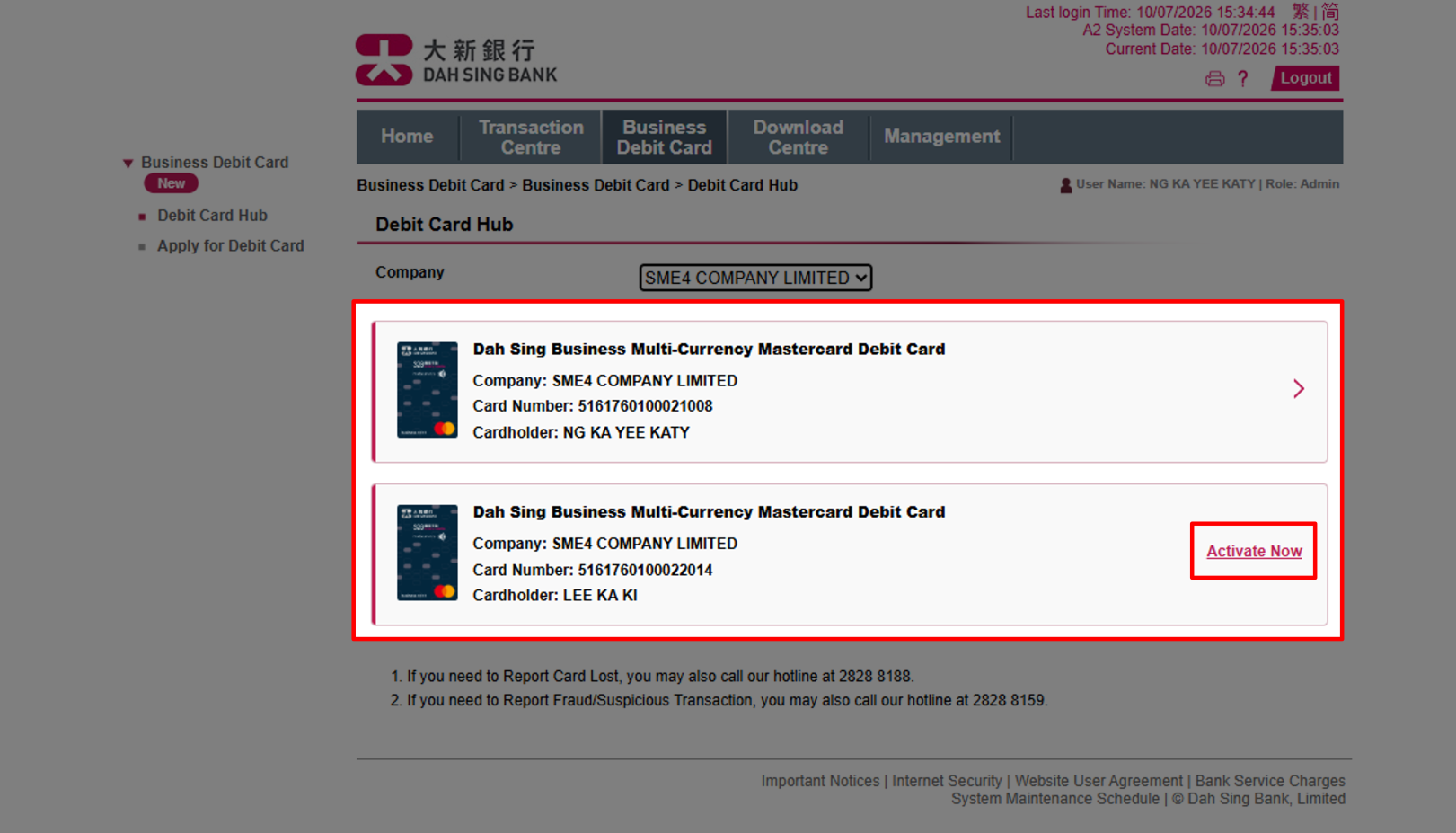
(Administrator) Once you have received the Dah Sing Business Multi-Currency Mastercard Debit Card, you may log in to 328 Business e-Banking to activate your debit card within the "Debit Card Hub" of "Business Debit Card".

Activate Debit Card (Via 328 Business e-Banking)

Activate Debit Card (Via 328 Business e-Banking)

(Administrator) Once you have received the Dah Sing Business Multi-Currency Mastercard Debit Card, you may log in to 328 Business e-Banking to activate your debit card within the "Debit Card Hub" of "Business Debit Card".

Activate Debit Card (Via 328 Business e-Banking)

Activate Debit Card (Via 328 Business e-Banking)

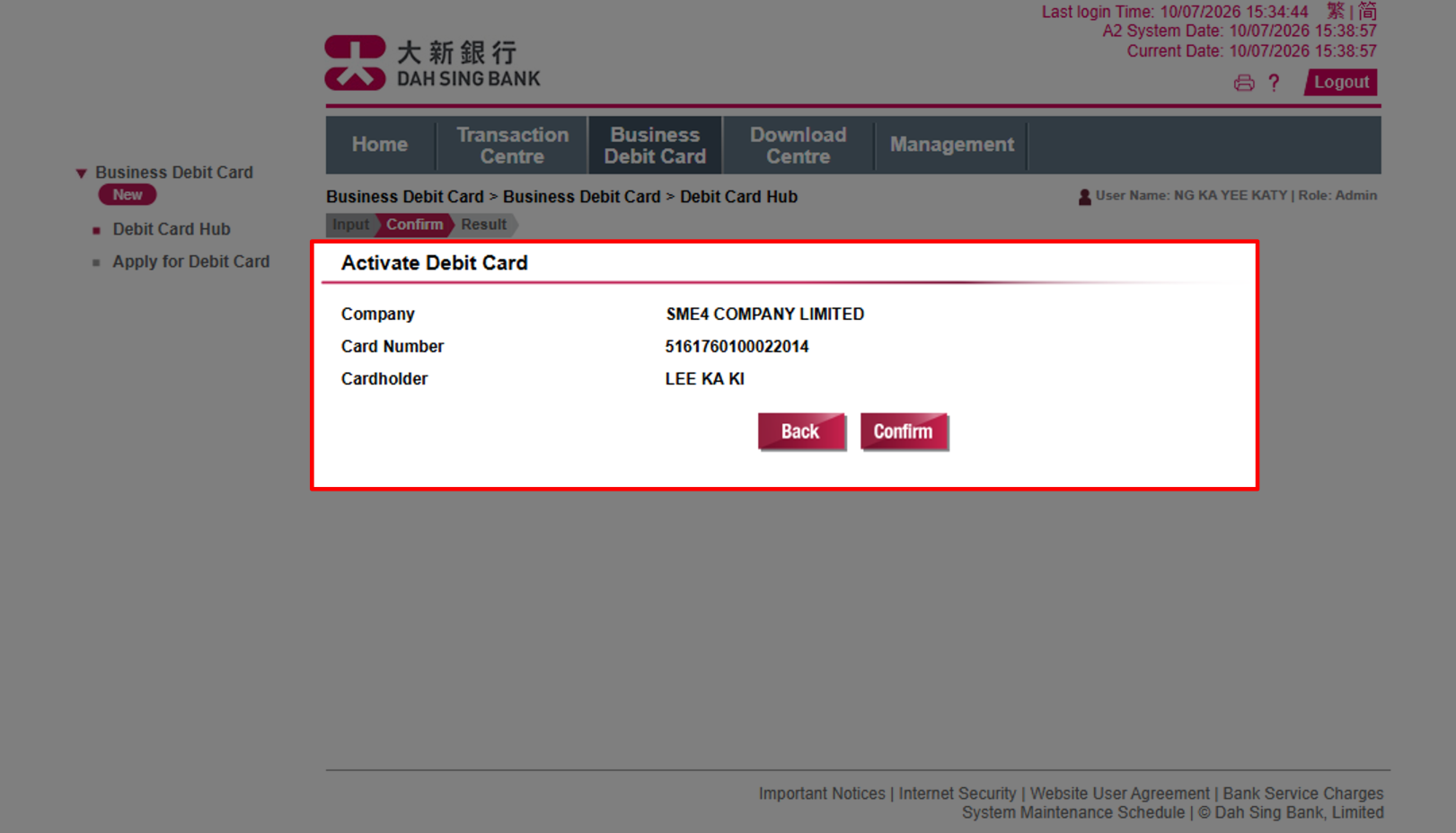
(Administrator) After confirming that the debit card details are correct, click "Confirm" to submit the debit card activation request.

Activate Debit Card (Via 328 Business e-Banking)

Activate Debit Card (Via 328 Business e-Banking)

(Administrator) After confirming that the debit card details are correct, click "Confirm" to submit the debit card activation request.

Activate Debit Card (Via 328 Business e-Banking)

Activate Debit Card (Via 328 Business e-Banking)

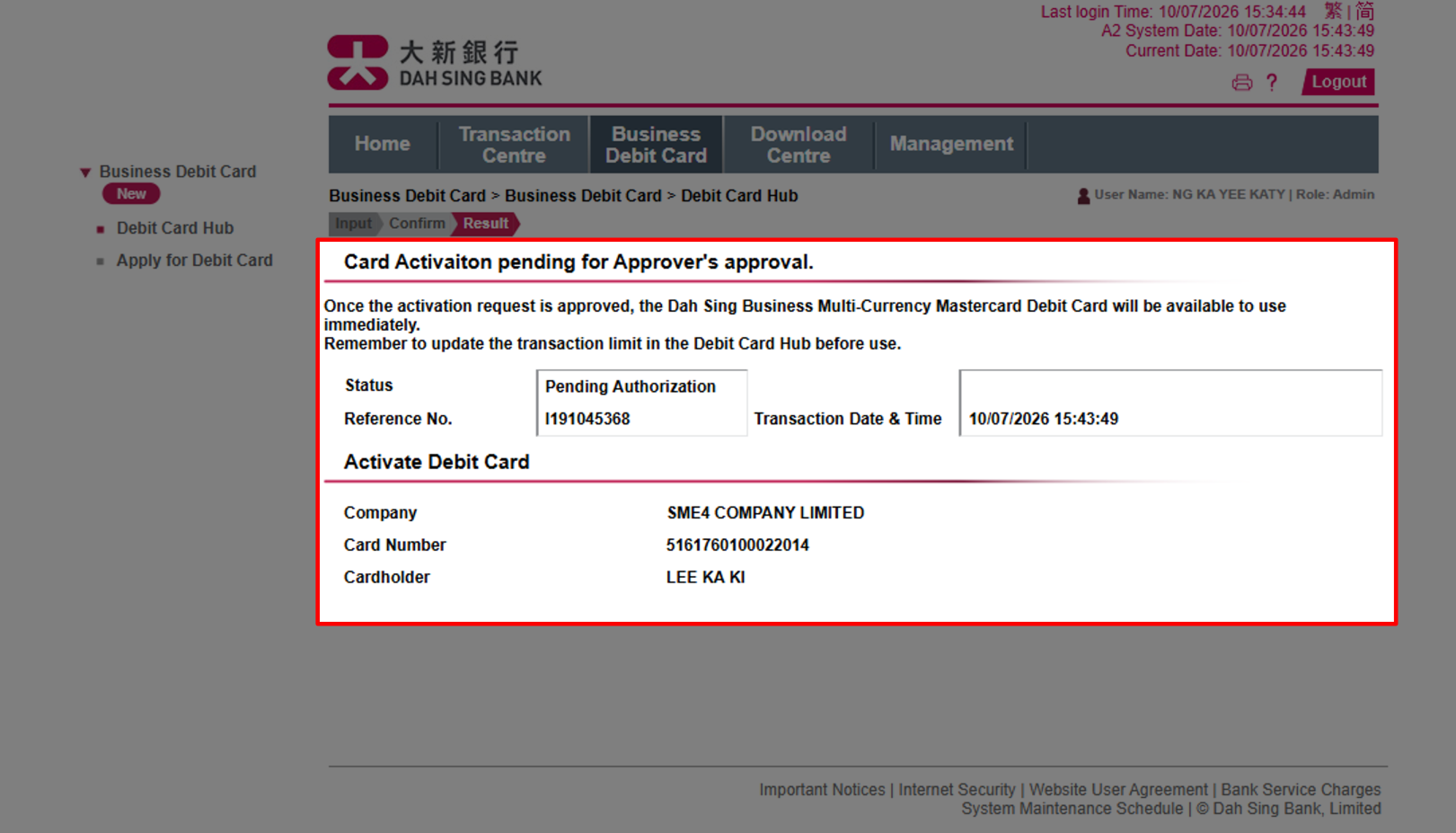
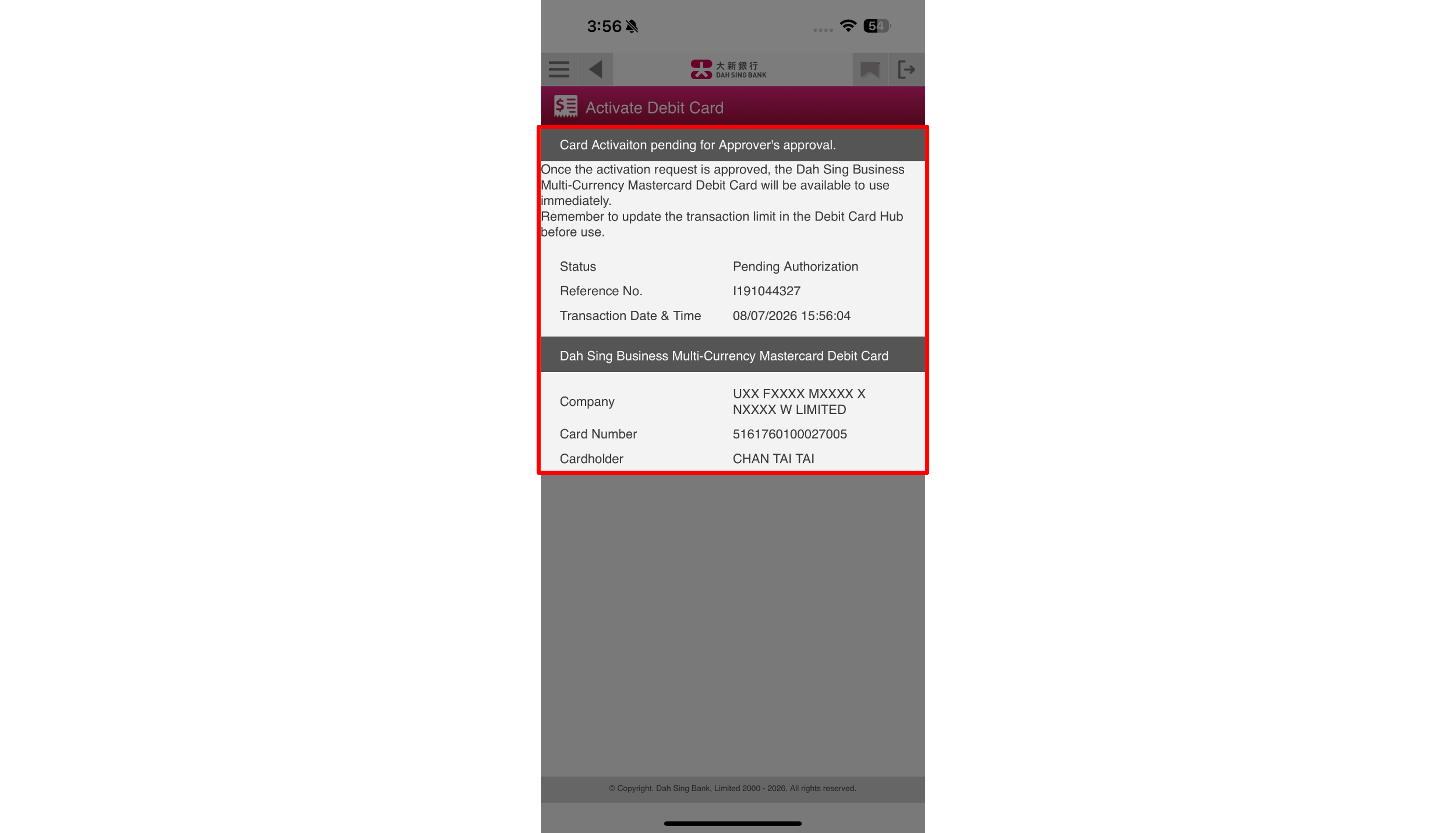
(Administrator) Due to security reason, after successfully submitting the debit card activation request, the instruction must be approved by an Approver in order to complete the activation process.

Activate Debit Card (Via 328 Business e-Banking)

Activate Debit Card (Via 328 Business e-Banking)

(Administrator) Due to security reason, after successfully submitting the debit card activation request, the instruction must be approved by an Approver in order to complete the activation process.

Activate Debit Card (Via 328 Business e-Banking)

Activate Debit Card (Via 328 Business e-Banking)

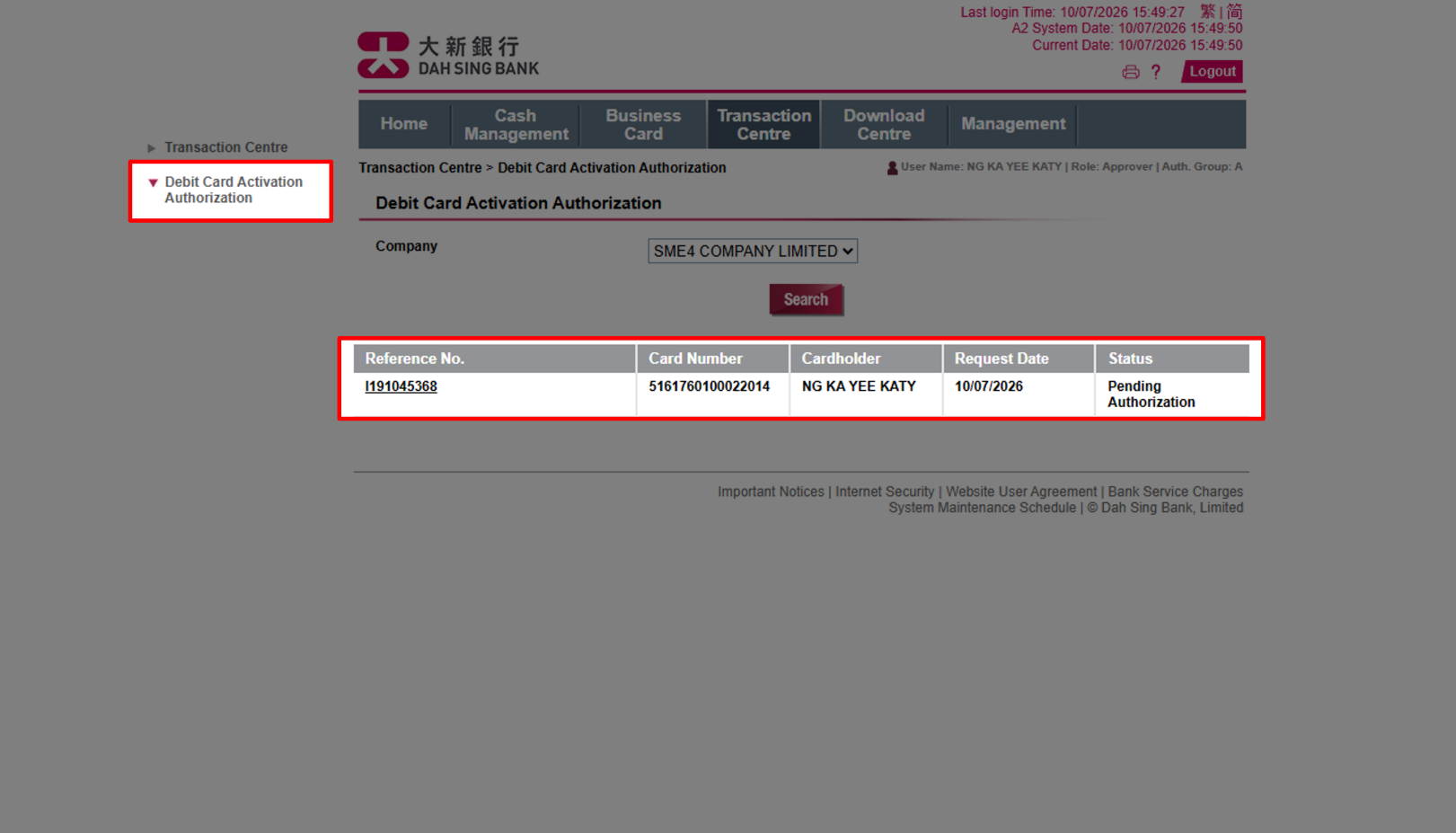
(Approver) Log in to 328 Business e-Banking as Approver, then navigate to "Debit Card Activation Authorization" under "Transaction Centre," and choose the corresponding debit card activation request.

Activate Debit Card (Via 328 Business e-Banking)

Activate Debit Card (Via 328 Business e-Banking)

(Approver) Log in to 328 Business e-Banking as Approver, then navigate to "Debit Card Activation Authorization" under "Transaction Centre," and choose the corresponding debit card activation request.

Activate Debit Card (Via 328 Business e-Banking)

Activate Debit Card (Via 328 Business e-Banking)

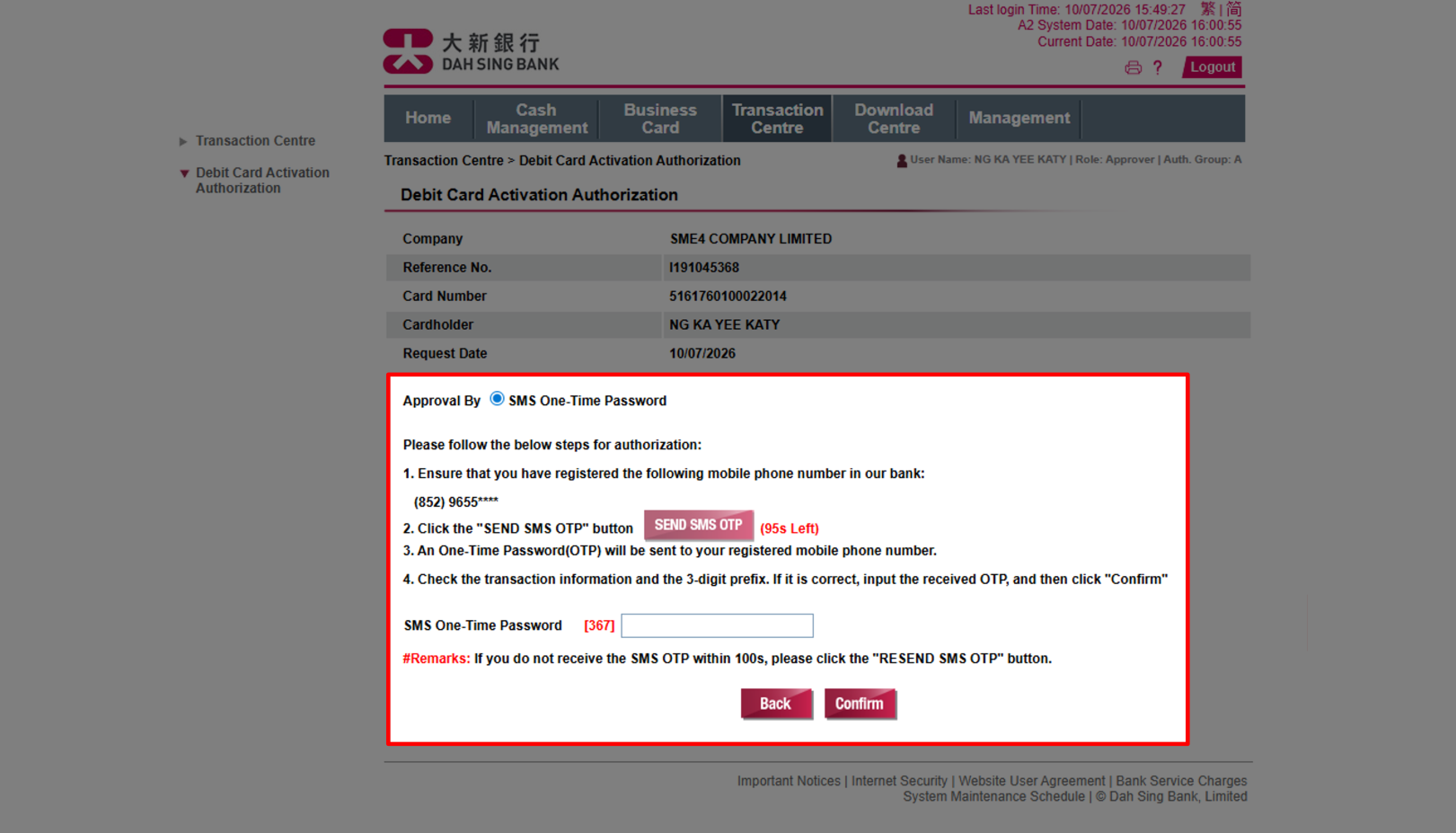
(Approver) After verifying the details, enter the SMS OTP received on the mobile phone number registered with us, then click "Confirm" to complete the debit card activation process. If you have Security Authentication service enabled, you may also authorize the activation through such option.

Activate Debit Card (Via 328 Business e-Banking)

Activate Debit Card (Via 328 Business e-Banking)

(Approver) After verifying the details, enter the SMS OTP received on the mobile phone number registered with us, then click "Confirm" to complete the debit card activation process. If you have Security Authentication service enabled, you may also authorize the activation through such option.

Activate Debit Card (Via 328 Business e-Banking)

Activate Debit Card (Via 328 Business e-Banking)

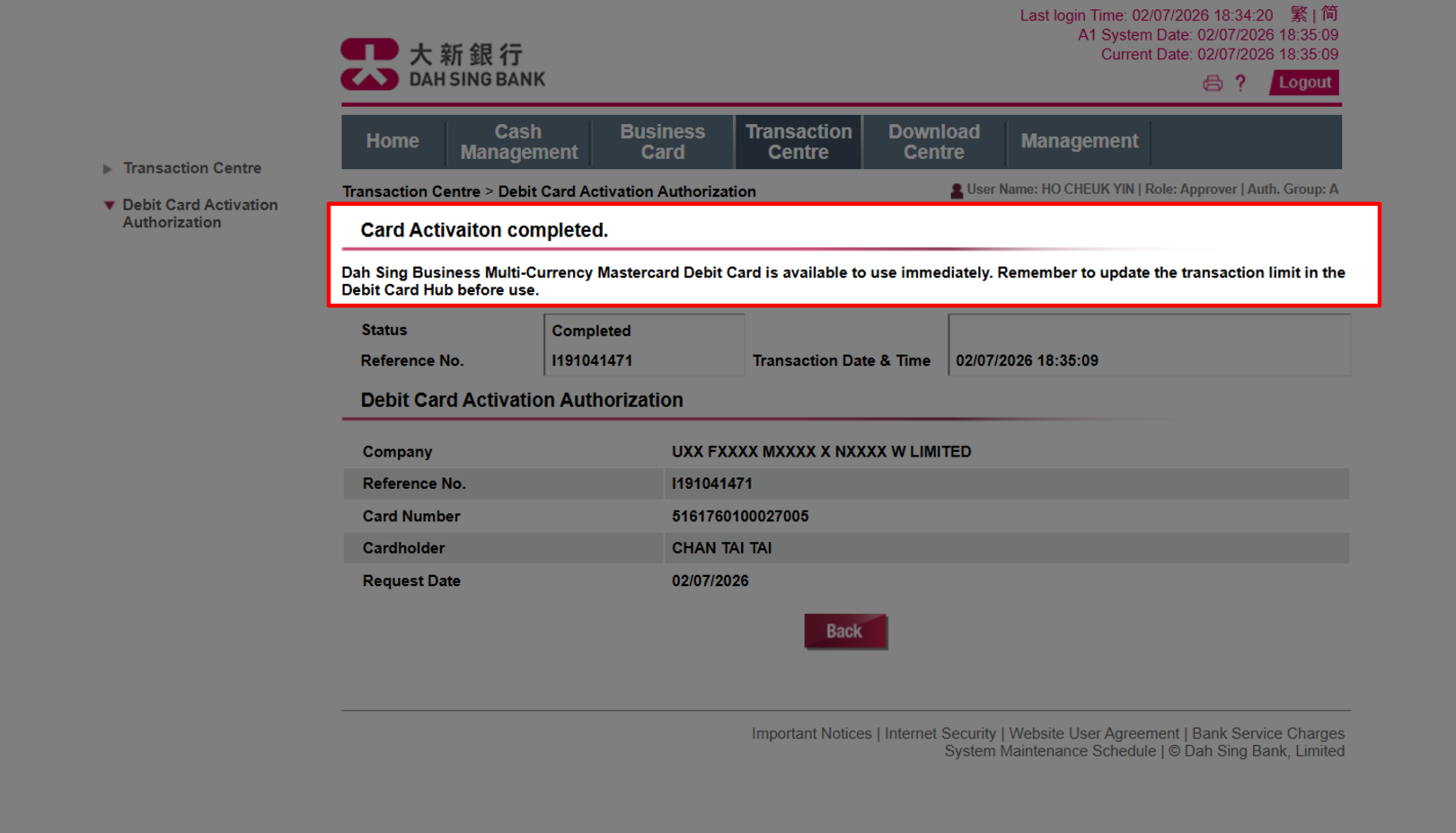
(Administrator) The debit card activation process is now completed, and the Dah Sing Business Multi-Currency Mastercard Debit Card is available to use immediately. As all transaction limits are set as zero by default, cardholder should update the transaction limit in the Debit Card Hub before use.

Activate Debit Card (Via 328 Business e-Banking)

Activate Debit Card (Via 328 Business e-Banking)

(Administrator) The debit card activation process is now completed, and the Dah Sing Business Multi-Currency Mastercard Debit Card is available to use immediately. As all transaction limits are set as zero by default, cardholder should update the transaction limit in the Debit Card Hub before use.

Activate Debit Card (Via 328 Business e-Banking)
Previous StepNext Step

Activate Debit Card (Via 328 Business Mobile Banking)

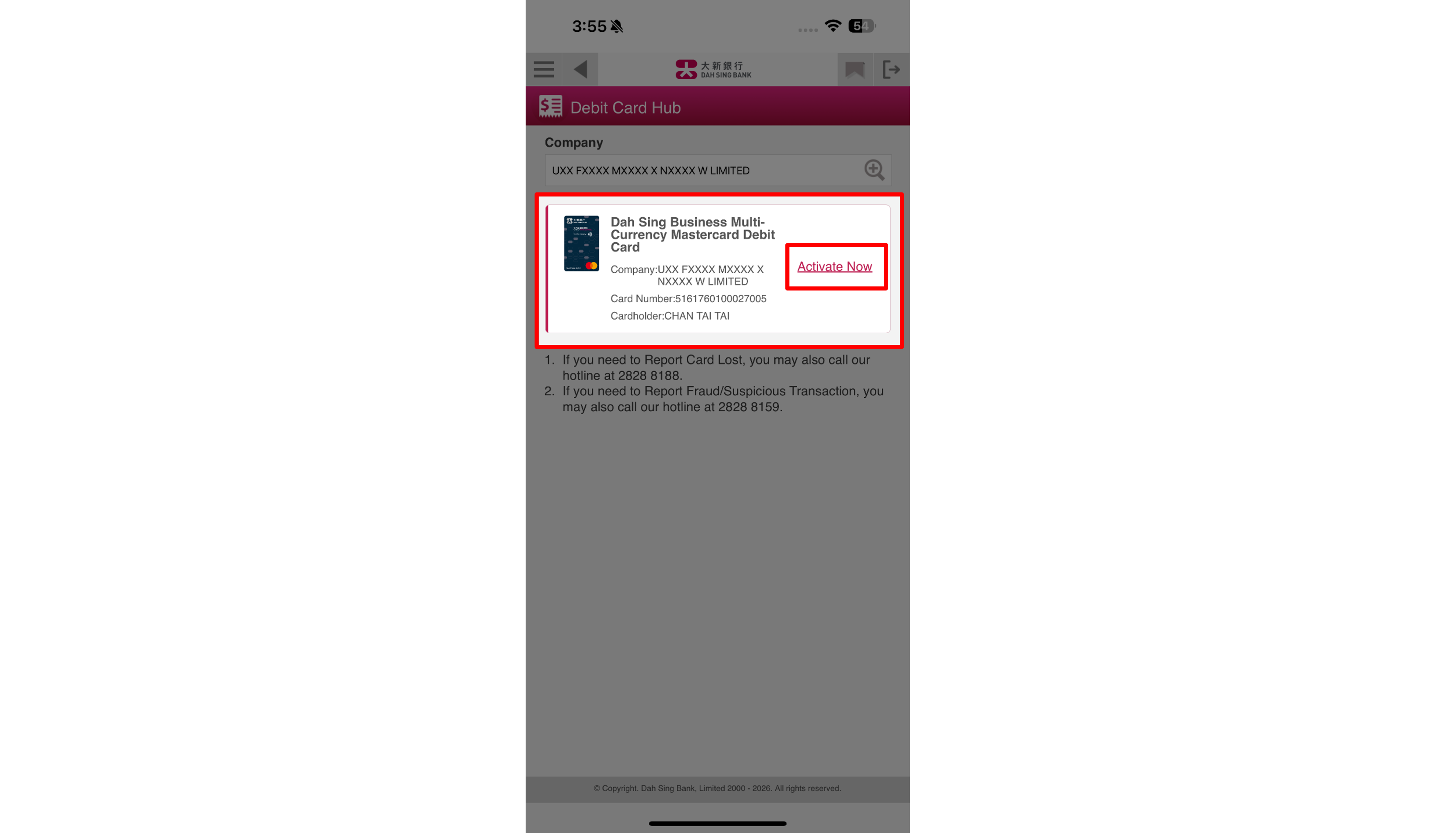
(Administrator) Once you have received the Dah Sing Business Multi-Currency Mastercard Debit Card, you may log in to 328 Business Mobile Banking to activate your debit card within the "Debit Card Hub" of "Business Debit Card".

Activate Debit Card (Via 328 Business Mobile Banking)

Activate Debit Card (Via 328 Business Mobile Banking)

(Administrator) Once you have received the Dah Sing Business Multi-Currency Mastercard Debit Card, you may log in to 328 Business Mobile Banking to activate your debit card within the "Debit Card Hub" of "Business Debit Card".

Activate Debit Card (Via 328 Business Mobile Banking)

Activate Debit Card (Via 328 Business Mobile Banking)

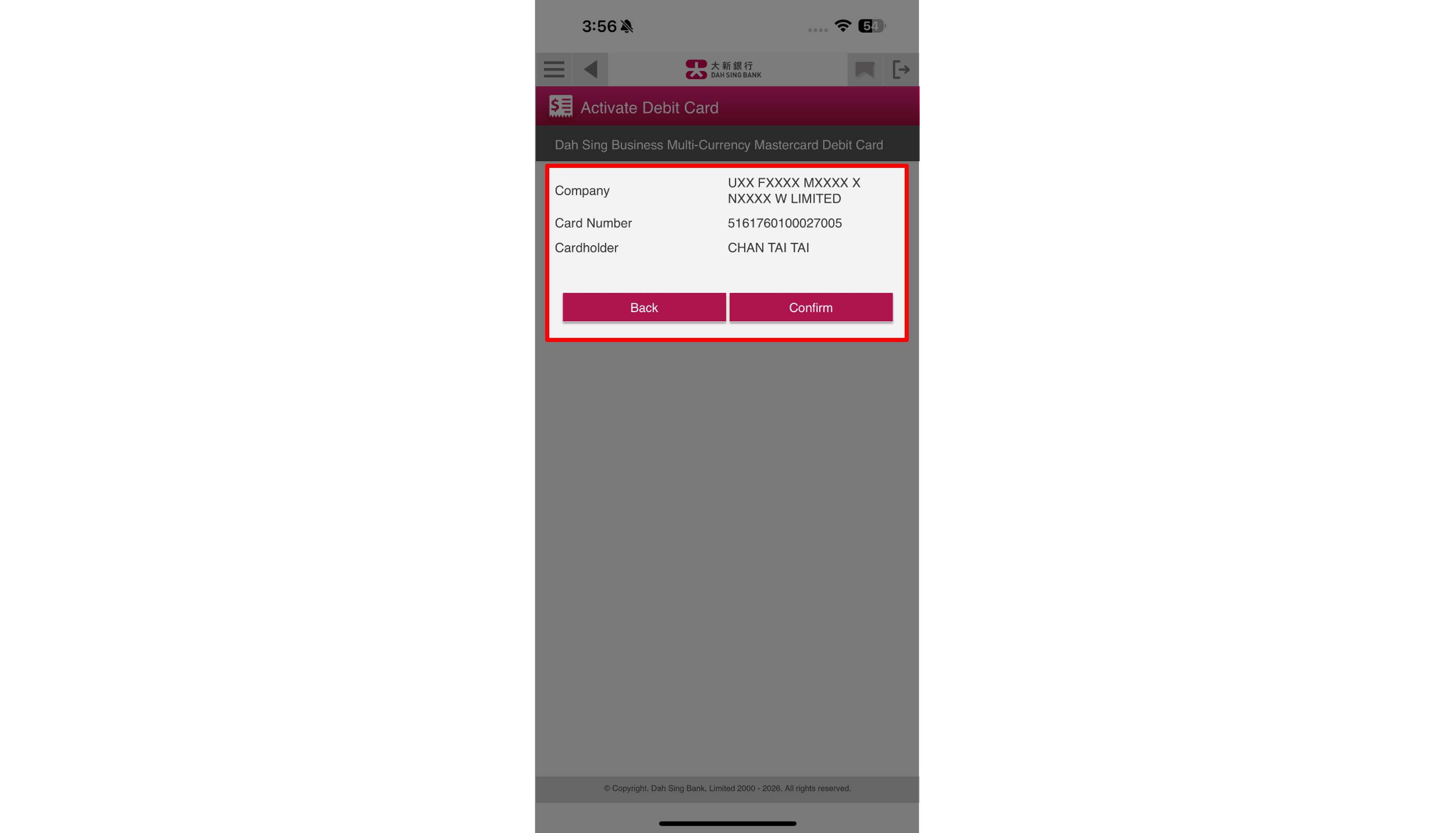
(Administrator) After confirming that the debit card details are correct, click "Confirm" to submit the debit card activation request.

Activate Debit Card (Via 328 Business Mobile Banking)

Activate Debit Card (Via 328 Business Mobile Banking)

(Administrator) After confirming that the debit card details are correct, click "Confirm" to submit the debit card activation request.

Activate Debit Card (Via 328 Business Mobile Banking)

Activate Debit Card (Via 328 Business Mobile Banking)

(Administrator) Due to security reason, after successfully submitting the debit card activation request, the instruction must be approved by an Approver in order to complete the activation process.

Activate Debit Card (Via 328 Business Mobile Banking)

Activate Debit Card (Via 328 Business Mobile Banking)

(Administrator) Due to security reason, after successfully submitting the debit card activation request, the instruction must be approved by an Approver in order to complete the activation process.

Activate Debit Card (Via 328 Business Mobile Banking)

Activate Debit Card (Via 328 Business Mobile Banking)

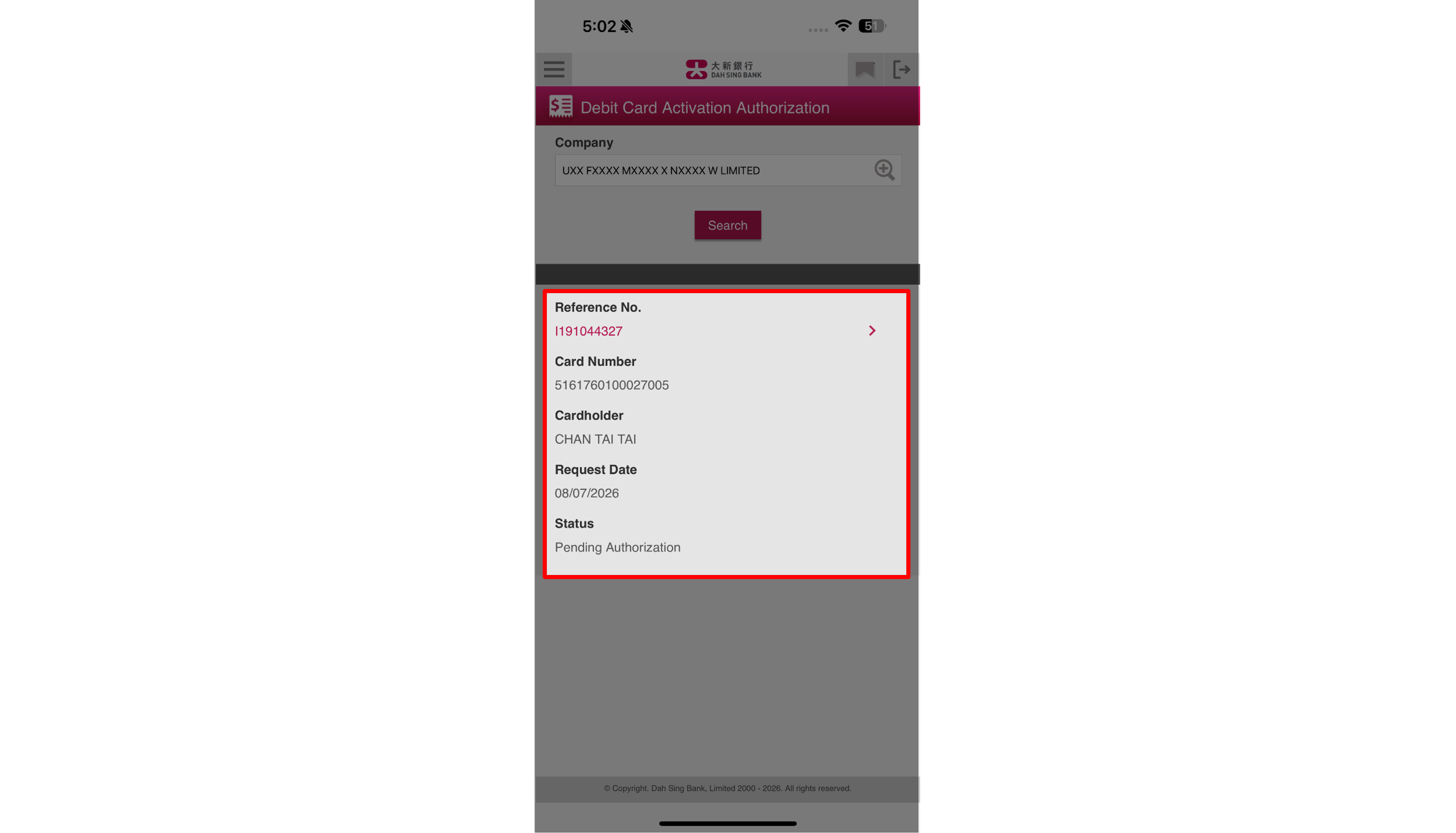
(Approver) Log in to 328 Business Mobile Banking as Approver, then navigate to "Debit Card Activation Authorization" under the homepage and choose the corresponding debit card activation request.

Activate Debit Card (Via 328 Business Mobile Banking)

Activate Debit Card (Via 328 Business Mobile Banking)

(Approver) Log in to 328 Business Mobile Banking as Approver, then navigate to "Debit Card Activation Authorization" under the homepage and choose the corresponding debit card activation request.

Activate Debit Card (Via 328 Business Mobile Banking)

Activate Debit Card (Via 328 Business Mobile Banking)

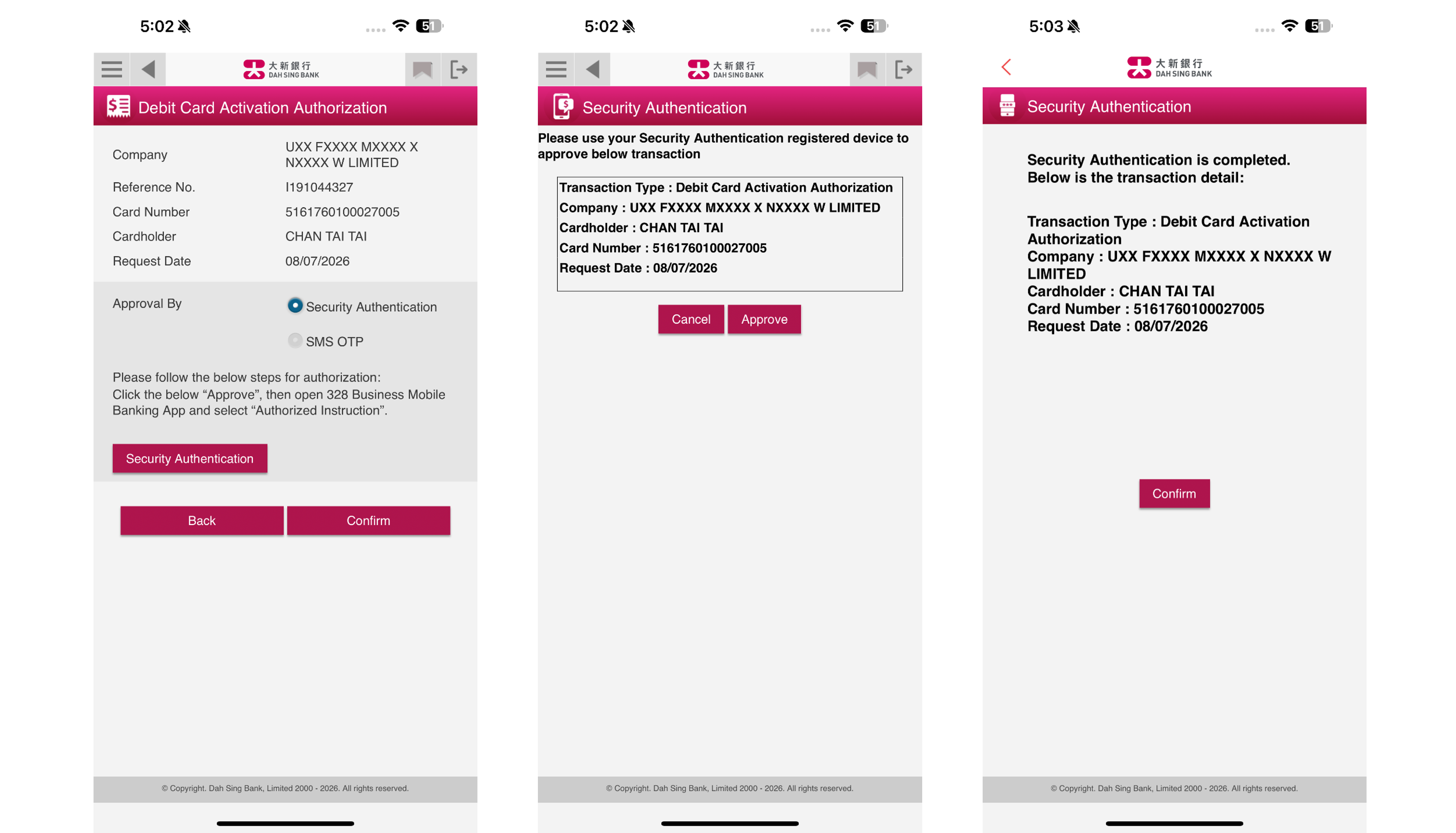
(Approver) After verifying the details, follow the on-screen instruction to perform Security Authentication, then click "Confirm" to complete the debit card activation process.

Activate Debit Card (Via 328 Business Mobile Banking)

Activate Debit Card (Via 328 Business Mobile Banking)

(Approver) After verifying the details, follow the on-screen instruction to perform Security Authentication, then click "Confirm" to complete the debit card activation process.

Activate Debit Card (Via 328 Business Mobile Banking)

Activate Debit Card (Via 328 Business Mobile Banking)

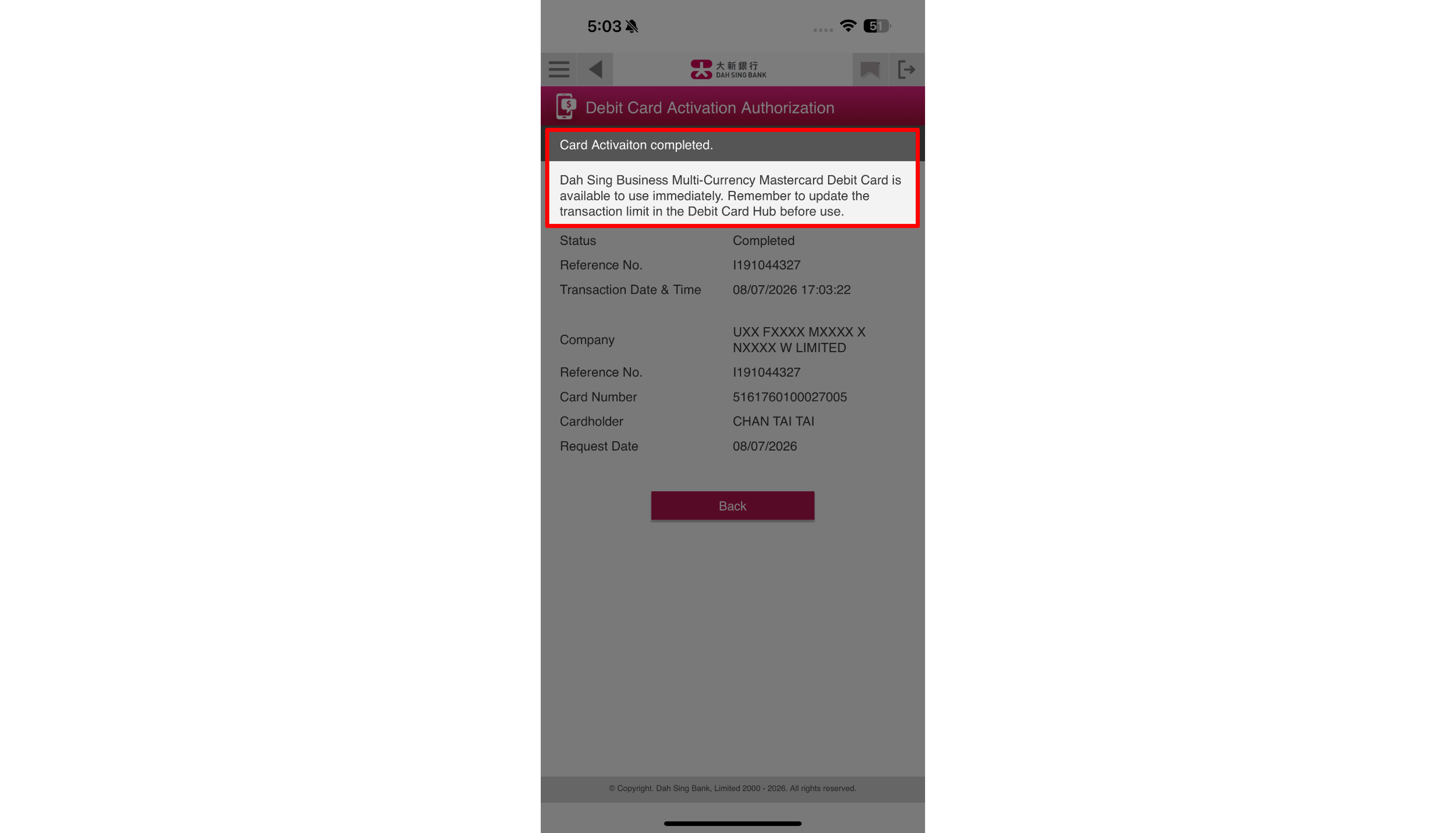
(Administrator) The debit card activation process is now completed, and the Dah Sing Business Multi-Currency Mastercard Debit Card is available to use immediately. As all transaction limits are set as zero by default, cardholder should update the transaction limit in the Debit Card Hub before use.

Activate Debit Card (Via 328 Business Mobile Banking)

Activate Debit Card (Via 328 Business Mobile Banking)

(Administrator) The debit card activation process is now completed, and the Dah Sing Business Multi-Currency Mastercard Debit Card is available to use immediately. As all transaction limits are set as zero by default, cardholder should update the transaction limit in the Debit Card Hub before use.

Activate Debit Card (Via 328 Business Mobile Banking)
Previous StepNext Step