Add Credit Card to Apple Pay / Google Pay
Log into Mobile Banking.
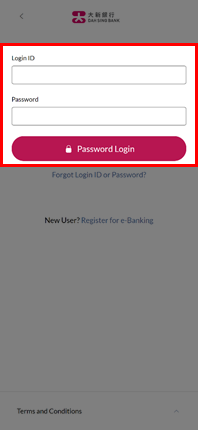
Log into Mobile Banking.
In home page, select the credit card you want to add to e-wallet.
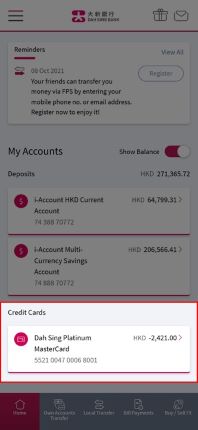
In home page, select the credit card you want to add to e-wallet.
Tap the Apple Pay / Google Pay button.
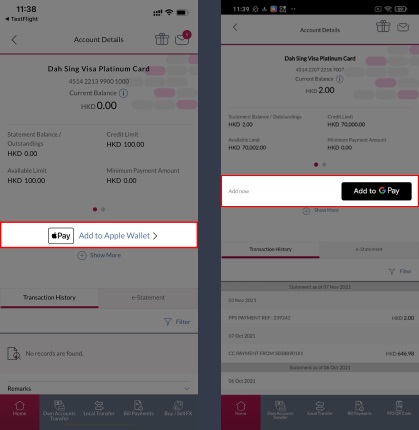
Tap the Apple Pay / Google Pay button.
Authorize the instruction by clicking any authentication method below.
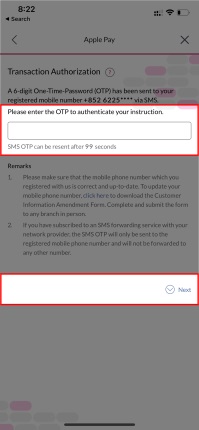
Authorize the instruction by clicking any authentication method below.
You will be directed to Apple Pay / Google Pay. Please read and accept the Terms and Conditions for Mobile Payment Service and then tap "Continue".
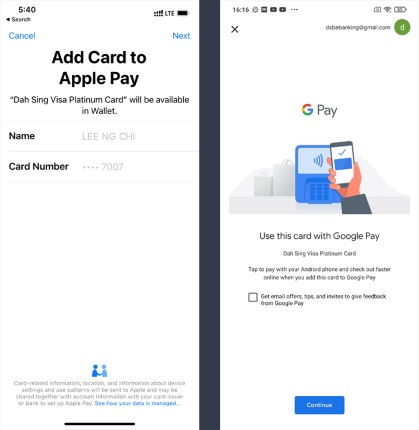
You will be directed to Apple Pay / Google Pay. Please read and accept the Terms and Conditions for Mobile Payment Service and then tap "Continue".
Your card has been added to Apple Pay / Google Pay and you can now enjoy contactless payment with Dah Sing Credit Card!
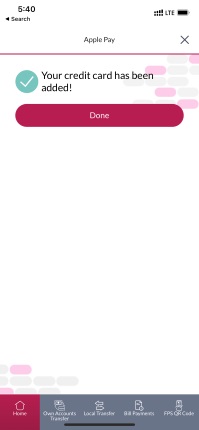
Your card has been added to Apple Pay / Google Pay and you can now enjoy contactless payment with Dah Sing Credit Card!